AI tools turn simple prompts or rough sketches into vivid images in seconds. They can copy styles like watercolor, vector, or 3D with ease. What once took hours now takes minutes. You can edit results fast, remove objects, expand edges, or adjust small details.
Artists work faster on ideas, ads, or books while staying in control. These tools are simple yet powerful. You don’t need great skills or big budgets. Anyone can create clean, strong visuals.
They help you move from idea to output without friction. The result is quick, clear, and ready to use for many creative needs.
Why AI Image Generation Matters in 2026
AI image generation is no longer experimental.
It powers:
- Marketing campaigns
- Book covers
- Social media visuals
- Product mockups
- Brand design
- Concept art
These tools help creators move faster.
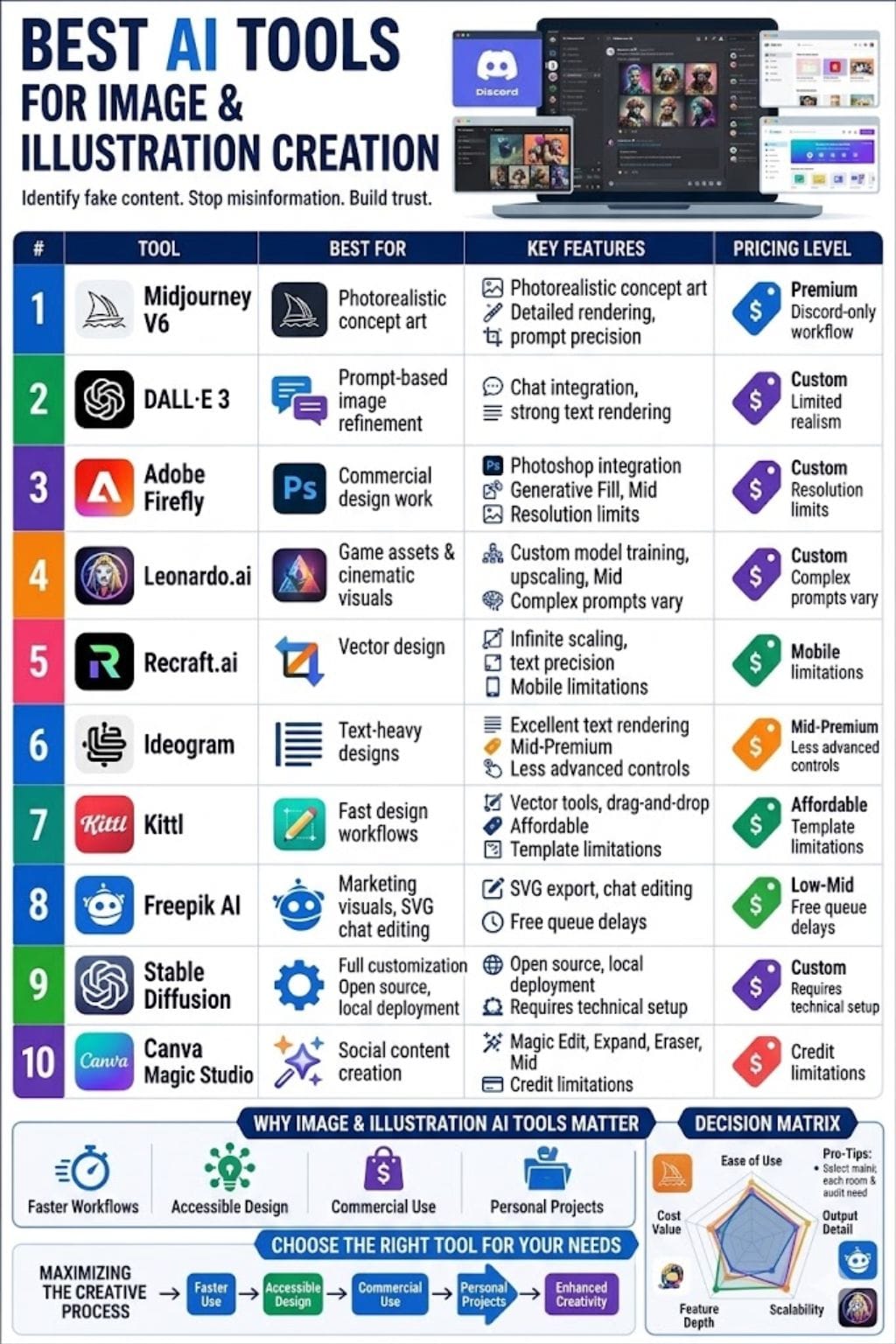
AI Illustration Generator Tools Comparison Table
| Tool | Best For | Key Features | Pricing Level | Drawbacks |
|---|---|---|---|---|
| Midjourney V6 | Photorealistic concept art | Detailed rendering, prompt precision | Premium | Discord-only workflow |
| DALL·E 3 | Prompt-based image refinement | Chat integration, strong text rendering | Custom | Limited realism |
| Adobe Firefly | Commercial design work | Photoshop integration, Generative Fill | Mid | Resolution limits |
| Leonardo.ai | Game assets & cinematic visuals | Custom model training, upscaling | Mid | Complex prompts vary |
| Recraft.ai | Vector design | Infinite scaling, text precision | Affordable | Mobile limitations |
| Ideogram | Text-heavy designs | Excellent text rendering | Mid-Premium | Less advanced controls |
| Kittl | Fast design workflows | Vector tools, drag-and-drop | Affordable | Template limitations |
| Freepik AI | Marketing visuals | SVG export, chat editing | Low-Mid | Free queue delays |
| Stable Diffusion | Full customization | Open source, local deployment | Custom | Requires technical setup |
| Canva Magic Studio | Social content creation | Magic Edit, Expand, Eraser | Mid | Credit limitations |
Midjourney V6
Midjourney V6 turns text into clear, rich images. It handles long prompts well and keeps strong detail. It follows instructions closely and renders text inside images better than before. It can upscale fast to 2048×2048 pixels.
The tool turns images into usable prompts. Artists use it to create concept art, characters, and marketing visuals in minutes. It shows hands, fabric, and light with more realism.
You can edit results in Discord using seeds, weights, and styles like watercolor or 3D. It saves time, but you still need to refine prompts to get the best results.
Pros
- Photo-realistic results
- Handles long prompts
- Strong community presets
Cons
- Discord-only access
- Prompt learning curve
Pricing
| Plan | Pricing |
|---|---|
| Request for Pricing | Custom |
DALL·E 3
DALL·E 3 turns text into clear, sharp images with rich detail. It works inside ChatGPT, so you can chat, edit, and refine with ease. You can create high-resolution art in many styles, like digital, watercolor, or 3D.
It handles complex scenes and text with strong accuracy. Creators use it for ideas, marketing visuals, books, and early concepts. The results stay close to your prompt and look professional.
It is fast, simple, and smart. This makes it a strong tool for artists, teams, and anyone who wants quick, high-quality visuals without a long design process or extra tools.
Pros
- Great text rendering
- Prompt refinement through chat
- Safe outputs
Cons
- Blocks artist-name styles
- Limited hyper-realism
Pricing
| Plan | Pricing |
|---|---|
| Request for Pricing | Custom |
Adobe Firefly
Adobe Firefly turns text, sketches, or photos into clean illustrations in seconds. It works inside Adobe Photoshop and Adobe Illustrator, so edits feel easy and smooth.
You can make images from text, change styles like watercolor or vector, and use Generative Fill to add or remove objects. Generative Shape Fill helps build vector details fast. Simple sliders adjust light, color, and size.
It helps users create scenes, mockups, and ideas with speed and control. Outputs are trained on Adobe Stock data, so they are safe for commercial use and real projects.
Pros
- Creative Cloud integration
- Commercial-safe outputs
- Fast revisions
Cons
- Resolution limitations
- Text/light corrections needed
Pricing
| Plan | Pricing |
|---|---|
| Firefly Standard | $9.99/month |
| Firefly Pro | $19.99/month |
| Firefly Pro Plus | $24.96/month |
 StartupTalky- Business News, Insights and StoriesVivek Dev Jacob
Leonardo.ai
Leonardo.ai turns simple text or rough sketches into clear, sharp images. It is great for lifelike photos, game assets, anime, and cinematic art. The tool lets you train your own models, so your style stays unique.
It also offers real-time upscaling and easy editing tools. You can adjust style, lighting, and detail with simple controls. Results are fast and clean. There are many community models to explore and use.
It works well for design, marketing, and character art. Both beginners and pros can create high-quality visuals quickly without a steep learning curve or complex setup.
Pros
- Fast generation
- Custom models
- Beginner-friendly
Cons
- Complex prompts vary
- Hand and face fixes needed
Pricing
| Plan | Pricing |
|---|---|
| Essential | $12/month |
| Premium | $30/month |
| Ultimate | $60/month |
Recraft.ai
Recraft.ai turns text prompts into sharp vector or raster illustrations fast. It crafts logos, icons, posters, and clip art in styles ranging from watercolor to 3D.
Key perks include precise text control with 1500+ fonts, background removal, inpainting, outpainting, mockup creation, and custom style libraries from your images.
Edit with ease, refine sketches, upscale, or mix styles. Designers love its pro canvas for infinite scaling without blur, ideal for brands, sites, and prints. Free tier gives 30 daily credits; paid plans unlock private images and more power. It speeds workflows but shines best with practice.
Pros
- Infinite vector scaling
- Custom styles
- Accurate text placement
Cons
- Scene unpredictability
- Mobile limitations
Pricing
| Plan | Pricing |
|---|---|
| Basic | $12/month |
| Pro | $20/month |
Ideogram
Ideogram turns text into clear, sharp images in seconds. It handles words inside images better than most tools, which makes it great for logos, labels, and posters. You can choose styles like realistic, anime, or minimal.
Model 3.0 gives the best results. You can set size, colors, and even upload a reference to match your brand.
It also lets you remix public images or upscale your work. The free plan helps you get started fast. It is quick and strong with text. But paid plans limit use, and fine control can feel tight for advanced users.
Pros
- Excellent text rendering
- Fast results
- Free plan available
Cons
- Paid limits
- Complex prompts can struggle
Pricing
| Plan | Pricing |
|---|---|
| Plus | $20/month |
| Pro | $60/month |
StartupTalky- Business News, Insights and StoriesVivek Dev Jacob
Kittl
Kittl uses AI to turn text into clear images fast. You can make vector art, clip art, or photo-like images with ease.
It has simple drag-and-drop tools. You can remove backgrounds, upscale images, and match styles using a sample. It works well for text-heavy designs like posters, logos, and mockups.
You can resize, vectorize, and build assets in minutes. It also helps you create icons, patterns, and layouts without hard skills. You get speed from AI and control to edit. It suits both new users and pros. It makes design quick, clean, and easy.
Pros
- Fast visual generation
- Commercial rights
- Strong editing tools
Cons
- Free token limits
- Fewer templates
Pricing
| Plan | Pricing |
|---|---|
| Pro | $15/editor/month |
| Expert | $35/editor/month |
| Max | $65/editor/month |
Freepik AI
Freepik AI turns simple text into clean, professional images in seconds. You can choose styles like realistic or vector with ease. It lets you adjust colors, shapes, and details without effort.
You can also use chat to create or refine images in real time. This makes it useful for ads, social posts, and brand visuals. It supports SVG export, quick upscaling, and style mixing.
The tool is fast, simple, and flexible. You do not need design skills to get good results. It helps you move from idea to final visual without delay.
Pros
- Fast generation
- Easy modifications
- Multiple design systems
Cons
- Less pro-level control
- Queue delays on the free plan
Pricing
| Plan | Pricing |
|---|---|
| Essential | $6.79/month |
| Premium | $14.22/month |
| Premium+ | $31.83/month |
| Pro | $206.90/month |
Stable Diffusion
Stable Diffusion turns text into clear images in many styles, like anime, oil paint, and fantasy. It can make new pictures from scratch. It can also change an image you upload with image-to-image. You can edit parts with inpainting.
Users can train the model for a custom look. You can guide results with negative prompts. The code is open source. You can run it on your own machine or in apps. It gives strong control, not just ease.
It helps artists move fast. It speeds up concept art and keeps ideas flowing for teams and solo creators today.
Pros
- Full customization
- Strong image quality
- Local deployment
Cons
- Needs a powerful GPU
- Technical setup required
Pricing
| Plan | Pricing |
|---|---|
| Request for Pricing | Custom |
StartupTalky- Business News, Insights and StoriesVivek Dev Jacob
Canva Magic Studio
Canva Magic Studio makes it easy to turn simple text into clean, sharp images in seconds. It uses smart tools to create art from your ideas, change objects with Magic Edit, remove mistakes with Magic Eraser, and extend scenes with Magic Expand.
You can add motion with Magic Animate, reshape text into bold styles, and pick up elements to move them around. Everything works inside Canva’s simple editor, so you don’t need design skills.
The result is fast, smooth, and looks professional. It helps you create strong visuals for posts, ads, and stories.
Pros
- Easy workflow
- Great for teams
- Beginner-friendly
Cons
- Advanced features locked
- Credit limitations
Pricing
| Plan | Pricing |
|---|---|
| Pro | $18/month |
| Business | $25/person/month |
| Enterprise | Contact Sales |
How to Choose the Right AI Image Generator
- For Photorealism: Choose Midjourney V6
- For Chat-Based Simplicity: Choose DALL·E 3
- For Commercial Projects: Choose Adobe Firefly
- For Full Customization: Choose Stable Diffusion
- For Social Media Content: Choose Canva Magic Studio
- For Text-Based Designs: Choose Ideogram
Final Thoughts
AI tools open art to everyone. They turn simple words into clear, vivid images. You can create styles, scenes, and designs fast. You do not need great skills.
Just describe, adjust, and finish. This gives creators more speed for books, ads, and ideas. People still guide the work. AI helps, but it does not replace human vision. Costs go down, and more people can create.
Access grows across the world. Soon, any idea can become a real image. The future joins human thought with smart tools. Together, they make art easier, faster, and more open to all.
FAQs
What are AI image generation tools?
AI image generation tools are software platforms that create images from text prompts, sketches, or reference visuals using artificial intelligence. They can generate artwork in styles like realistic photography, watercolor, vector graphics, anime, and 3D design within seconds.
Which is the best AI image generator in 2026?
The best AI image generator depends on your needs. Midjourney V6 is best for photorealistic concept art, DALL·E 3 is great for chat-based creation, Adobe Firefly is ideal for commercial projects, and Stable Diffusion offers the most customization for advanced users.
Can beginners use AI image generation tools?
Yes, many AI image generation tools are beginner-friendly. Platforms like Canva Magic Studio, Freepik AI, and Kittl offer simple interfaces that let users create professional visuals without advanced design skills or technical knowledge.
Why are AI image generators important for creators?
AI image generators help creators save time, reduce design costs, and quickly turn ideas into polished visuals. They are widely used for marketing, social media, branding, publishing, concept art, and digital content creation, making visual design faster and more accessible.
Original Article
(Disclaimer – This post is auto-fetched from publicly available RSS feeds. Original source: Startuptalky. All rights belong to the respective publisher.)